> ## Documentation Index
> Fetch the complete documentation index at: https://docs.estizee.app/llms.txt
> Use this file to discover all available pages before exploring further.
# Apple Calendar Sync
> The Apple Calendar Sync section explains how to integrate Estizee with Apple Calendar to keep your schedule consistent across devices.
***Google Calendar sync is recommended due to its simper setup and better current optimization. Apple Calendar sync is still being improved.***
This ensures that all jobs, appointments, and team assignments are synchronized in real-time.
## **Benefits**
* **Real-time Updates**: Changes in Estizee reflect automatically in Apple Calendar.
* **Team Coordination**: Team members can view assigned jobs on their Apple devices.
* **Conflict Prevention**: Maintain a single source of truth for schedules and avoid double-booking.
## **Setup Process**
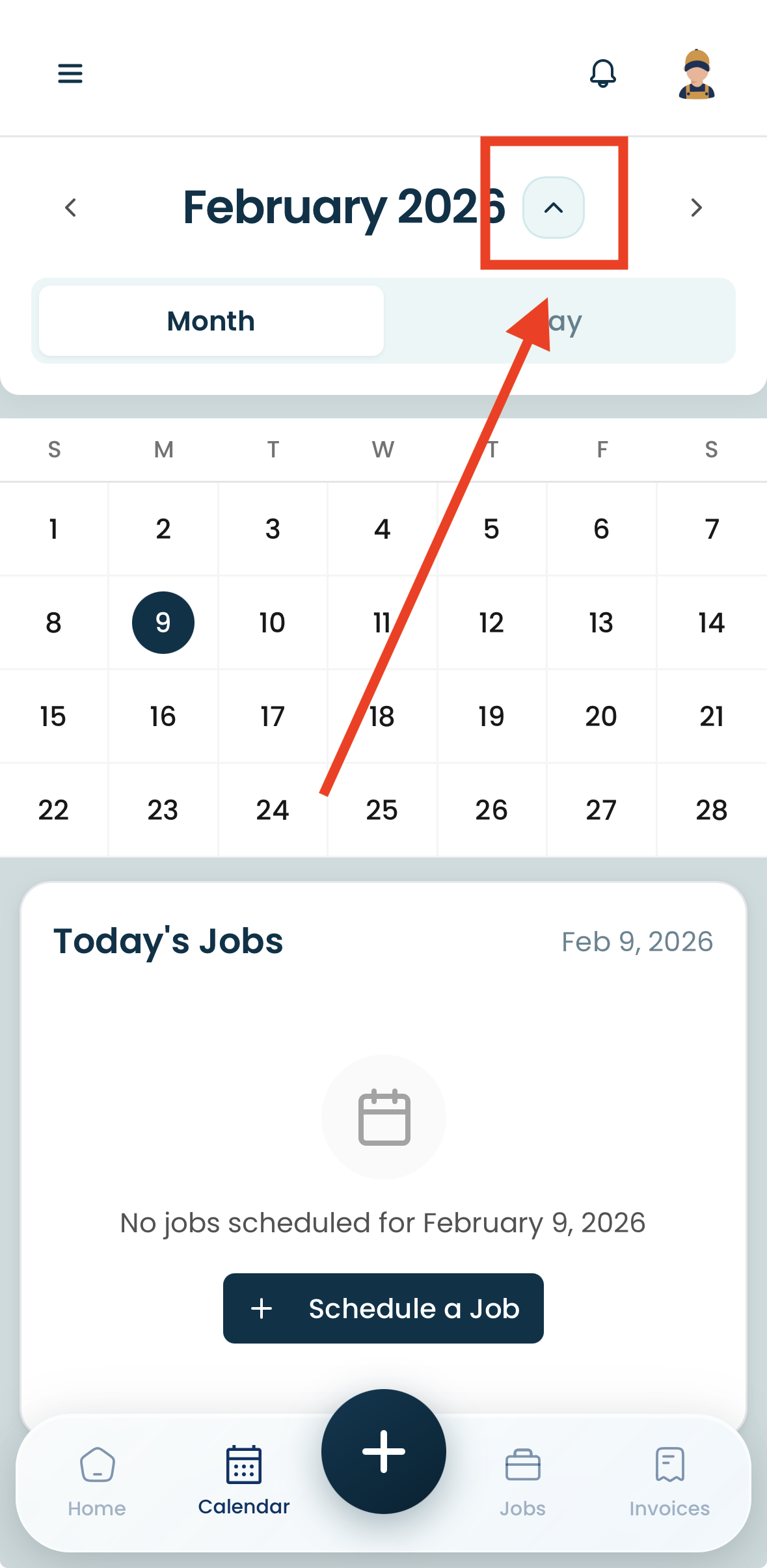
Navigate to the Calendar page.
Click on the upside down arrow near the month and year on the calendar.
 Sign in with your Apple account.
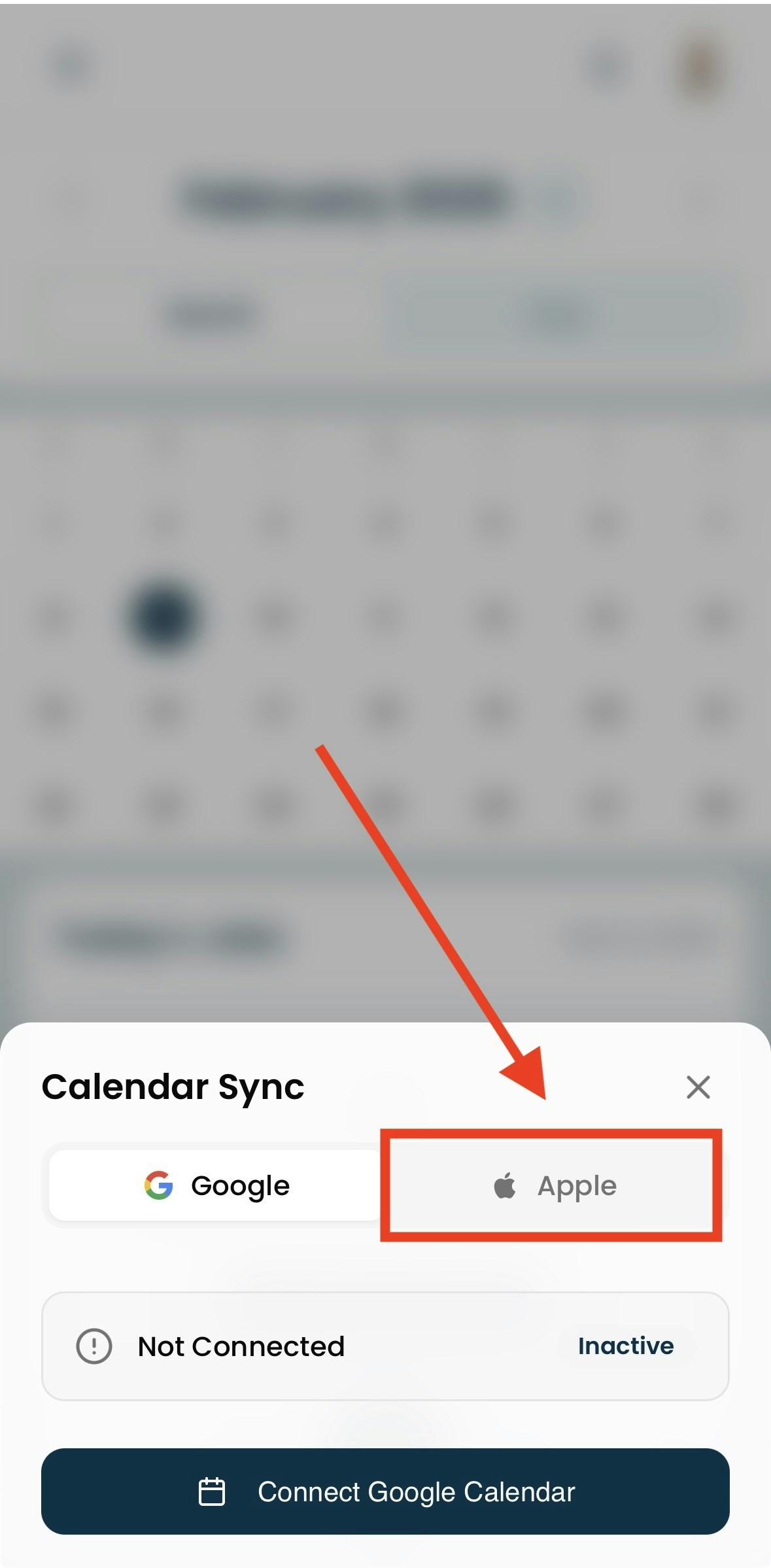 Grant permissions to allow Estizee to access your calendar.
Select which calendar(s) to sync with Estizee.
Save settings to activate the integration.
## **Sync Behavior**
* **Two-way Sync**: Jobs created, updated, or deleted in Estizee automatically reflect in Apple Calendar.
* **Notifications**: Only scheduling information is synced; job details, pricing, or customer info are not transferred.
* **Multiple Calendars**: You can sync different Apple Calendars for different teams or locations.
## **Best Practices**
* Periodically review calendar permissions to maintain sync functionality.
* Avoid manual edits in Apple Calendar for Estizee jobs to prevent discrepancies.
* Use calendar colors or labels to distinguish teams or job types.
* Monitor sync logs in Estizee for errors or conflicts.
Proper Apple Calendar integration keeps Estizee schedules accurate, improves team coordination, and prevents scheduling conflicts across Apple devices.
Grant permissions to allow Estizee to access your calendar.
Select which calendar(s) to sync with Estizee.
Save settings to activate the integration.
## **Sync Behavior**
* **Two-way Sync**: Jobs created, updated, or deleted in Estizee automatically reflect in Apple Calendar.
* **Notifications**: Only scheduling information is synced; job details, pricing, or customer info are not transferred.
* **Multiple Calendars**: You can sync different Apple Calendars for different teams or locations.
## **Best Practices**
* Periodically review calendar permissions to maintain sync functionality.
* Avoid manual edits in Apple Calendar for Estizee jobs to prevent discrepancies.
* Use calendar colors or labels to distinguish teams or job types.
* Monitor sync logs in Estizee for errors or conflicts.
Proper Apple Calendar integration keeps Estizee schedules accurate, improves team coordination, and prevents scheduling conflicts across Apple devices.